How do I make a Fuzzy Dream Dance AI video from my pet's photo?
Updated:
Short answer
Upload one full-body photo of your pet or an adult standing and facing the camera, keep the yard or pick another place, and MimicZip builds the dance. Check a 5-second bonus preview, then spend 1 credit on the 10-second 720p video. No prompt to write.
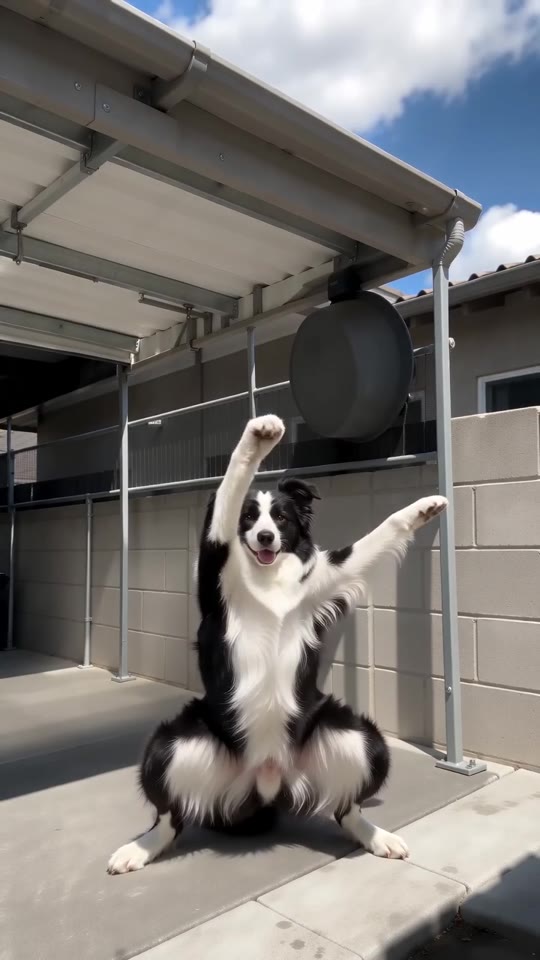
From one photo to the squat
- Open the template page. There is a single box. Use a sharp full-body photo of one pet or one adult, standing and facing the camera, as JPG, PNG or WebP up to 10 MB.
- Pick the place: a sunny yard (the default), a living room, a beach, a stage, a street or a rooftop. Pick the outfit: your own, a white tee with grey trousers, a tracksuit, a pastel hoodie, a bold shirt or all black. Pick the light: bright daylight, golden hour, neon night, soft overcast or spotlight. None changes the price.
- Pick 9:16 for TikTok, Reels and Shorts, or 16:9 for YouTube and desktop screens.
- Consent, login, pack. Tick the photo-consent box and sign in with Google. Previews come inside a pack.
- Check the preview. It is watch-only, 5 seconds at 480p, with a PREVIEW badge. Look at whether the dancer matches your photo and whether the squat is wide; it runs the moves faster than the full video.
- Render: 1 credit gives the 10-second 720p MP4 with no watermark, saved in My videos.
- Add the sound and your caption in TikTok, starting the sound about 3 seconds in.
The moves already built in
The camera is fixed on the full body. From 0 to 0.7 seconds the dancer drops into the squat. Until about 3.5 seconds there is a low bounce with rolling forearms, until 6 seconds both hands are on the head, until 8 seconds the knees shake and the last two seconds are one arm thrown high.
A pet stands up on its hind legs and uses its front paws as arms. Nothing is lip-synced and no text is drawn; faces and timing shift a little each run.
After rendering
Download the MP4 or copy a share link from My videos. Our video follows seconds 3 to 13 of the @dowaynesmiler5 yard clip, so add the DjLukeyC sound about 3 seconds in; the sound guide has the steps.
Questions people ask
Do I need to write a prompt?
No. The camera, the framing and the order of the moves are fixed. You provide one photo and choose the place, the outfit and the light.
Can the photo be a close-up?
A full-body photo works best, because the whole dance happens low and wide. A photo cut off at the waist makes the legs harder to get right.
Can I close the page while it renders?
Yes. Rendering carries on at our end, and the finished video is saved under your account in My videos.
Make your own Fuzzy Dream Dance video
Upload one photo and make a 10-second HD video from $8.99. No subscription, and the full video has no watermark.
Make my video